The pest control industry relies heavily on field technicians who visit homes, offices, warehouses, restaurants, and industrial facilities to perform treatments and inspections. Managing these technicians efficiently can be challenging—especially when dealing with multiple daily appointments, emergency requests, route planning, and service documentation.
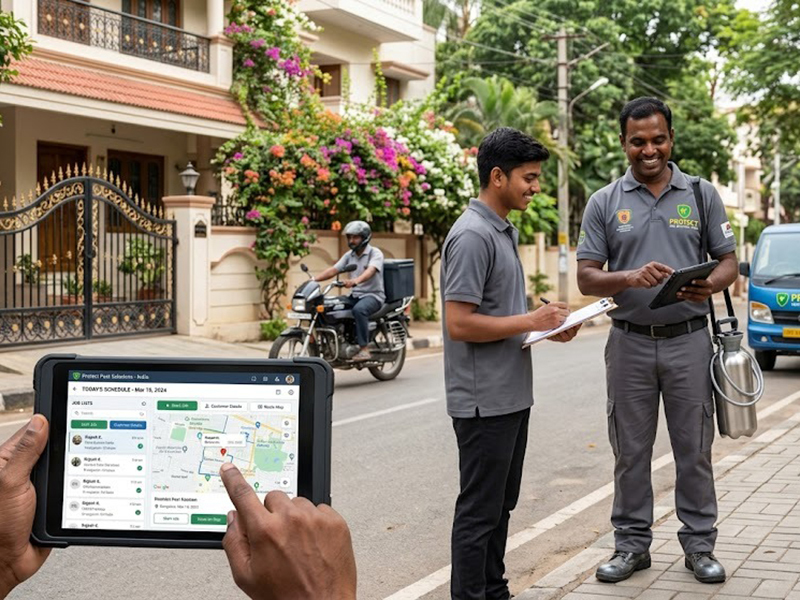
This is where pest control technician management software becomes essential. Modern technician management systems provide mobile apps and centralized dashboards that allow pest control companies to assign jobs, guide technicians to locations, track service activities, capture evidence, and confirm service completion—all in real time.
In this article, we’ll explore how technician management software works, the key features it offers, and how pest control businesses can use it to improve operational efficiency and customer satisfaction.
What is Pest Control Technician Management Software?
Pest control technician management software is a digital platform designed to coordinate field technicians and service operations. It typically includes:
- Admin dashboard for managers
- Technician mobile app
- Job scheduling and assignment tools
- Customer service history database
- Service documentation and reporting
With this system, managers can easily assign service requests, while technicians receive tasks directly on their smartphones.
Instead of relying on phone calls, spreadsheets, or manual paperwork, pest control companies can operate with a fully digital workflow.
Challenges Pest Control Companies Face Without Technician Management Software
Many pest control companies still rely on traditional methods for managing technicians. This often leads to several operational issues.
1. Manual Job Assignments
Dispatchers often assign jobs via phone calls or WhatsApp messages. This increases the risk of miscommunication and scheduling errors.
2. Lack of Real-Time Visibility
Managers may not know whether technicians are on-site, en route, or delayed.
3. Paper-Based Service Reports
Technicians often fill out paper forms that need to be manually entered later.
4. Limited Customer Records
Without centralized systems, it becomes difficult to track past treatments or recurring contracts.
5. Poor Documentation
Evidence of pest infestations or treatment completion may not be properly recorded.
Technician management software solves these issues through automation and mobile technology.
Key Features of Pest Control Technician Management Software
1. Job Assignment and Dispatching
One of the most important features of technician management software is automated job assignment.
Managers can assign tasks through an admin dashboard and instantly notify technicians via the mobile app.
Example Scenario
A pest control company receives three service requests in the morning:
- Termite inspection in a residential property
- Cockroach treatment for a restaurant
- Rodent control in a warehouse
The dispatcher assigns these jobs to different technicians based on:
- Location
- Skill specialization
- Availability
Technicians instantly receive notifications on their mobile app with all the necessary job details.
2. GPS Navigation and Route Optimization
Field technicians often travel across cities to serve multiple clients daily. Efficient route planning helps save time and fuel.
Technician apps typically include:
- GPS navigation
- Integrated map directions
- Route optimization
Example
A technician in the field may have five appointments in different parts of the city. The app guides them to the next location using optimized routes, helping them avoid traffic and delays.
This ensures:
- Faster service delivery
- More appointments per day
- Lower travel costs
3. Digital Service Checklists
Pest control services often follow standard treatment procedures. Technician apps allow companies to create digital checklists to ensure consistent service quality.
For example, a termite treatment checklist may include:
- Inspect foundation walls
- Identify termite activity
- Drill treatment holes
- Apply chemical barrier
- Seal treated areas
- Provide treatment recommendations
Technicians complete these steps within the mobile app before marking the job as complete.
This ensures that every service follows standardized protocols.
4. Photo Uploads and Service Documentation
Visual documentation is extremely important in pest control services.
Technicians can upload photos of:
- Pest infestation areas
- Treatment procedures
- Before-and-after results
- Damaged structures
- Chemical application zones
These photos are automatically attached to the customer’s service record.
Example
During a termite inspection, the technician captures photos of:
- Mud tubes
- Damaged wooden structures
- Termite colonies
These images are stored in the system and shared with the customer as part of the service report.
This builds transparency and trust with customers.
5. Customer Confirmation and Digital Signatures
After completing a service, technician apps allow customers to confirm the work.
Customers can:
- Review the service summary
- Sign digitally
- Provide feedback
Example
After completing a cockroach control treatment in a restaurant kitchen, the technician shows the digital report to the restaurant manager.
The manager reviews the service details and signs on the technician’s mobile device to confirm completion.
This provides:
- Proof of service
- Reduced disputes
- Better accountability
6. Service History and Customer Records
Technician management systems store complete service histories for every customer.
This includes:
- Previous pest treatments
- Inspection reports
- Technician notes
- Photos and documentation
- Warranty details
Example
If a customer calls again regarding a termite issue, the company can quickly review:
- When the last treatment was performed
- What chemicals were used
- Which technician handled the service
This helps technicians make better decisions during follow-up visits.
7. Real-Time Technician Tracking
Managers can monitor technician activity in real time.
The system shows:
- Technician location
- Job progress
- Service completion status
- Delayed appointments
This helps dispatchers manage schedules more effectively.
For example, if a technician finishes early, the dispatcher can assign them another nearby service request.
8. Automated Service Reports
Once a job is completed, the system can automatically generate a digital service report.
Reports may include:
- Treatment details
- Chemicals used
- Technician notes
- Photos
- Customer signature
These reports can be instantly shared with customers via:
- Email
- SMS
- Customer portal
This eliminates paperwork and improves professionalism.
Practical Field Service Examples
Residential Pest Control Visit
A homeowner books a cockroach control service through the company’s website.
Workflow:
- Booking appears in the admin dashboard.
- Dispatcher assigns the job to a nearby technician.
- Technician receives the job on their mobile app.
- App provides navigation to the customer’s location.
- Technician performs treatment using a digital checklist.
- Photos of infestation areas are uploaded.
- Customer signs the digital completion form.
- System sends an automated service report to the customer.
Commercial Pest Control Contract
A restaurant signs a monthly pest control contract.
Each month:
- The system automatically schedules inspection visits.
- A technician receives a recurring job notification.
- The technician performs the inspection and logs findings in the app.
- Reports are generated for compliance documentation.
This helps businesses meet hygiene and safety standards.
Warehouse Rodent Control
A warehouse facility requests a rodent inspection and bait station installation.
The technician:
- Receives the job on the mobile app
- Uses the checklist to install bait stations
- Uploads photos of installed traps
- Logs rodent activity observations
- Generates a digital inspection report
The warehouse manager receives a complete record for maintenance and audits.
Benefits of Pest Control Technician Management Software
Implementing technician management software provides significant benefits.
Improved Operational Efficiency
Automated scheduling and digital workflows reduce manual work.
Faster Service Delivery
GPS navigation and optimized routes help technicians complete more jobs daily.
Better Documentation
Photos, reports, and digital records improve service transparency.
Higher Customer Satisfaction
Customers receive clear service reports and confirmations.
Increased Team Productivity
Technicians spend less time on paperwork and more time performing services.
Why Pest Control Businesses Are Moving Toward Digital Field Management
As pest control businesses grow, managing technicians manually becomes increasingly difficult.
Digital technician management systems allow companies to:
- Scale operations efficiently
- Improve service quality
- Maintain accurate service records
- Enhance customer communication
- Reduce administrative overhead
For companies with multiple technicians and service locations, adopting this technology can significantly improve operational performance.
Book a Free Demo
If you run a pest control business and want to improve how you manage your technicians, adopting a pest control technician management software platform can make a huge difference.
With features like job scheduling, technician mobile apps, GPS navigation, service checklists, photo documentation, and automated reporting, your team can operate more efficiently while delivering better service to customers.
Book a free demo today to see how technician management software can help streamline your pest control operations and improve field service management.
Thinking of Launching a Platform Like This?
Many entrepreneurs and startup founders see opportunities in building digital platforms that solve real business problems—just like pest control technician management software.
Turnkey Infotech helps businesses and startups design and develop powerful digital solutions such as:
- Websites
- Ecommerce platforms
- Mobile apps
- SaaS platforms
- Marketplace platforms
- Custom business software
Building a platform like this requires the right technology architecture, scalable infrastructure, and experienced development teams to ensure the product works smoothly as it grows.
If you have an idea for a digital product or platform, the team at Turnkey Infotech can help you explore the concept, plan the technology stack, and understand how it could be built.
Whether you’re building a startup product or digitizing your business operations, expert guidance can make a huge difference.Request a Free Demo or Book a Free Consultation to discuss your idea and take the first step toward building your own platform.